Development of "I need to go"

Developing this game proved to be the biggest challenge so far. Not only on a technical level, but an artistic one too. Here's how I dealt with it, and how the game came to be.
About the game
The game is a Frogger clone, but with a twist. You play as a man who really needs to pee, but the urinals are on the other side. You must jump between cars, eager bikers and last but far from least, pedestrians who are just glued to their phones.
You can read more about that in the game's announcement post: I need to go is out!
With that said, let's take a look at the development of the game, starting off with the smooth parts of it. 😊
The smooth
As time moves on, I'm getting better and better at using Godot and its features. I noticed that getting started with creating scenes, managing them, and keeping them scalable comes to me quicker. OOP (Object-oriented programming) is nothing new to me, and with that, creating inheritable scenes didn't prove to be the most difficult thing.
I used it to create a base scene for all the obstacles the player can come against, and gave it an empty AnimatedSprite2D and CollisionShape2D. Inheriting this scene then allowed for quicker iteration to create the different obstacles like the biker, the car, ...
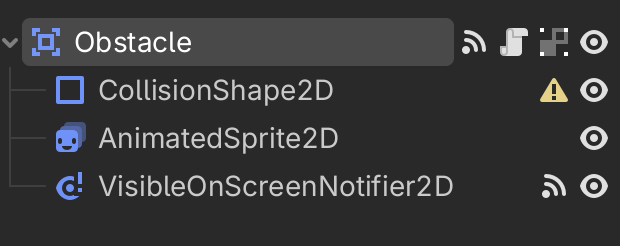
Scripting
Obstacles
I wrote scripts with the future in mind, particularly inheritance and scalability. The base scene contained a script that I knew every obstacle would have to use, for example movement, flipping itself (i.e. when it has to go to the right), destroying itself when out of bounds, etc.
You can view all the code on my Github, but essentially all obstacles need to move at a certain speed, in the left/right direction, and depending on that direction all properties must be flipped like the CollisionShape2D, the AnimatedSprite2D, etc.
@export_category("Entity")
@export var speed: float

var _can_die := false
var _direction := Vector2.LEFT

func _process(delta: float) -> void:
  position += _direction * speed * delta


func flip() -> void:
  _direction = Vector2.RIGHT
  $AnimatedSprite2D.flip_h = true
  $VisibleOnScreenNotifier2D.position.x *= -1
Player
Writing the main character proved to be a little difficult, particularly with movement, since the point was to keep the player moving in specific distances every time. All this to say that all in all, while initially quite tricky, the ideas I had for how the movement should technically work were not far from what the script looks like at the end of it.
Here's a snippet with an explanation:
func _physics_process(delta: float) -> void:
  # If we're already at the target position, return
  if next_position.is_equal_approx(position):
    return

  # If we're very close to the target position, snap to it.
  # This was to prevent a bug where the character would keep moving
  # slightly past the target position and entering and endless loop.
  var distance_to_target := position.distance_to(next_position)
  if distance_to_target <= move_speed * delta:
      position = next_position
      _can_move = true
      # Emit signal to indicate that the player has moved, used for points
      moved.emit()
      return

  # Set can_move to false and calculate the direction to the next position
  _can_move = false
  var direction := position.direction_to(next_position)

  # Move
  velocity = direction * move_speed
  move_and_slide()
Raycasts
Aside from this, the biggest lesson learned was how to use RayCast2D. I used them for two important things:
- Checking whether the player can move in a certain direction. (I.e. block movement if raycast collides with a wall).
- Checking if the player is in front of the pedestrian, in which case the pedestrian will push the player back.
The most interesting part, and one that took most time to figure out, was the force_update_transform function call. It was necessary to call this as we're checking the raycast's collision outside of the physics process, and because of that I needed to manually update its transform.
Here's the player's script that uses raycasts to detect if there's a wall in the next move:
# Assign raycasts to a dictionary with the direction as the key
@onready var raycasts := {
  Vector2.RIGHT: $RightRayCast2D,
  Vector2.LEFT: $LeftRayCast2D,
  Vector2.UP: $TopRayCast2D,
  Vector2.DOWN: $BottomRayCast2D
}

func _unhandled_key_input(event: InputEvent) -> void:
  if not _can_move:
    return

  if event.is_action_pressed("move_right"):
    _try_move(Vector2.RIGHT, "walk_side")
  elif event.is_action_pressed("move_left"):
    _try_move(Vector2.LEFT, "walk_side", true)
  elif event.is_action_pressed("move_up"):
    _try_move(Vector2.UP, "walk_vertical")
  elif event.is_action_pressed("move_down"):
    _try_move(Vector2.DOWN, "walk_vertical", true)

func _try_move(direction: Vector2, animation: String, flip_h: bool = false) -> void:
  # Get the raycast for the direction
  var raycast: RayCast2D = raycasts.get(direction)
  assert(raycast, "Invalid direction, raycast doesn't exist")

  # Force update the raycast.
  # This was something I learned on a whim from Godot's documentation,
  # and some friendly people on Reddit!
  raycast.force_update_transform()

  # If raycast doesn't collide with any wall, allow movement
  if not raycast.is_colliding():
    next_position += direction * move_distance
    animated_sprite.play(animation)
    animated_sprite.flip_h = flip_h
HUD
The HUD itself was a piece of cake, actually. The only struggle I had was with the TextureProgressBar, and I had an annoying issue that I couldn't find much about. I fixed it, you can read about that in a separate post if you wish!
Read it here: TextureProgressBar issue in Godot

Initial art
I say initial because I want to strictly talk about the sprites and their first frame. My art took some time to work decently, I watched plenty of videos on the basics of 2D art, ranging from how to draw characters, to what shading is.
All in all, I expect anyone to say that my art is beginner's art and I want that too. For one, because it'd feel weird not to have to improve, and because I want there to be a LOT of space for improvement for future comparisons, oh and because I suck at art. Nevertheless, beginner's work or not, my sprites resembled what I wanted them to resemble and that was plenty enough for me.
I suck at art, and I'm proud of that.
Let me cope.
— Me
The tough
After the initial sprites came the mission to animate them. This felt and sounded quite daunting to me as I've never even dipped a single finger in the world of animation. It's just never been a thing I had done before.
Thank you, YouTube creators!
Through various tutorials on YouTube regarding 2D art, animation, and color theory, the challenge became much less scary with each frame I drew. In the beginning it took me literal hours just to get the most basic walking animation and consider it okay. I don't know if perfectionism took over or not, but the most basic of movement you can think of, and I want you to think of two frames or so, would just not work for me.
With practice, it became slightly easier and what you now see in the game is what I ended up with. I frequently took inspiration from photos online by literally searching what I was trying to draw but add "from the side" and that gave me decent models to work off of.
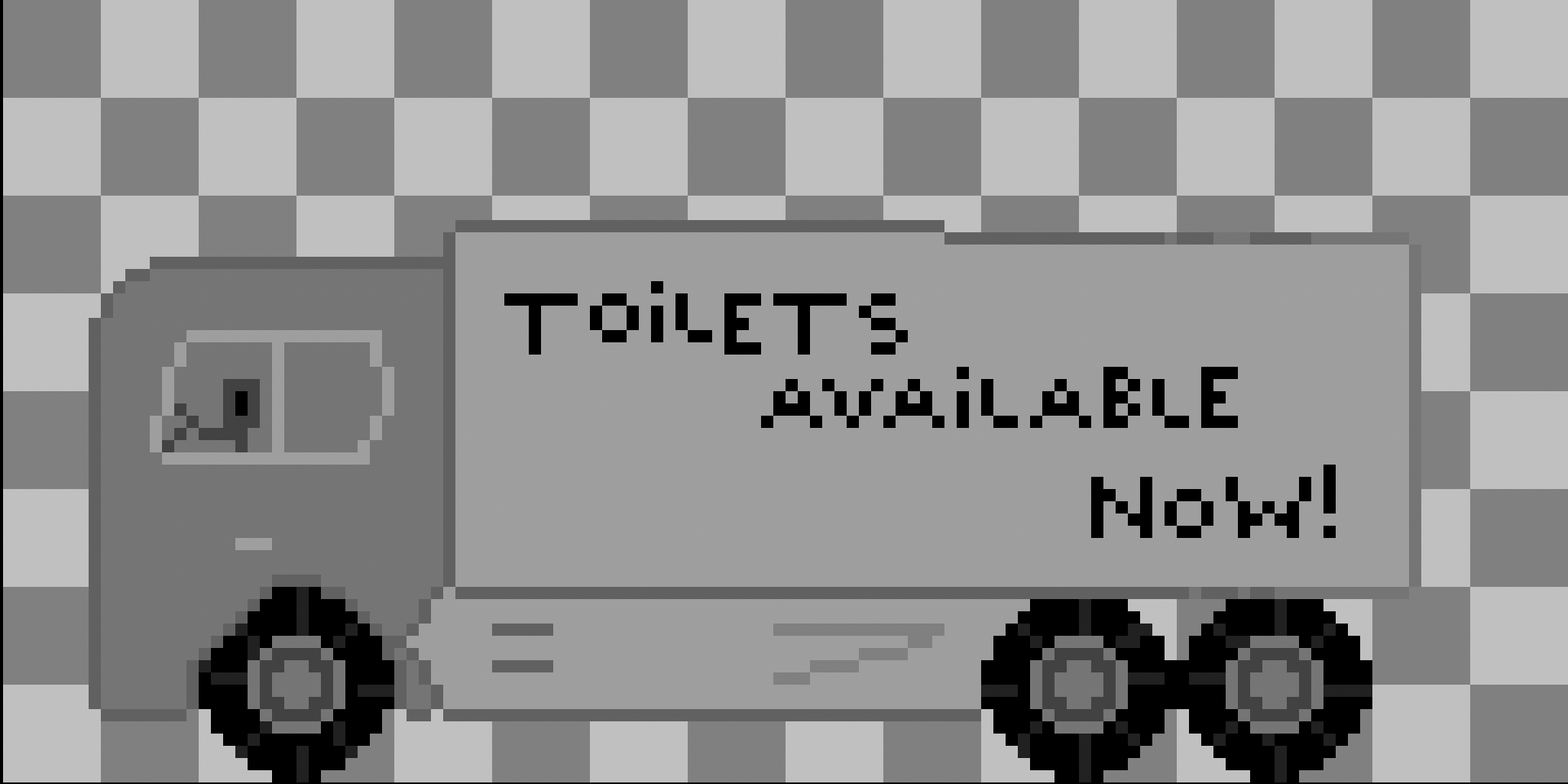
Here's my attempt at drawing a truck, which was later replaced with a prettier car:
You can see the final car in the game in a separate post I made about the improvements: Improving "I need to go"
I never thought colors could be this difficult
Let me tell you, drawing these sprites and making them move was one problem. Having them colored properly, consistently and in a way that doesn't literally hurt the eye, was a pain in the ass. I had watched so many videos on color theory, on how to create a color palette of my own, how to pick appropriate ones from Lospec, and how to apply them in my art. What a difficult skill this is to learn, let alone to master (oh, god)! I would have never expected this to be the biggest challenge to have during the creation of this game.
Initially, I was genuinely getting frustrated. Any color palette I chose, or made myself, I discarded 5 minutes later. I just couldn't get it to work, I couldn't get it to match the vision I had for this art, for this game. I kept trying for days, my whole weekend went on that. To be clear, I do not regret it and I want to learn more, and improve a lot as I go. I want to state that I genuinely have so much more respect for even the worst reviewed games, art, movies, .. Now that I have had a small taste of how difficult and time-stealing this is.
Luckily, just a mere night of good sleep resulted in me feeling more decisive and confident with my choices, and perhaps more patient with how art comes together when the colors are used all over the place instead of on just one sprite of many.
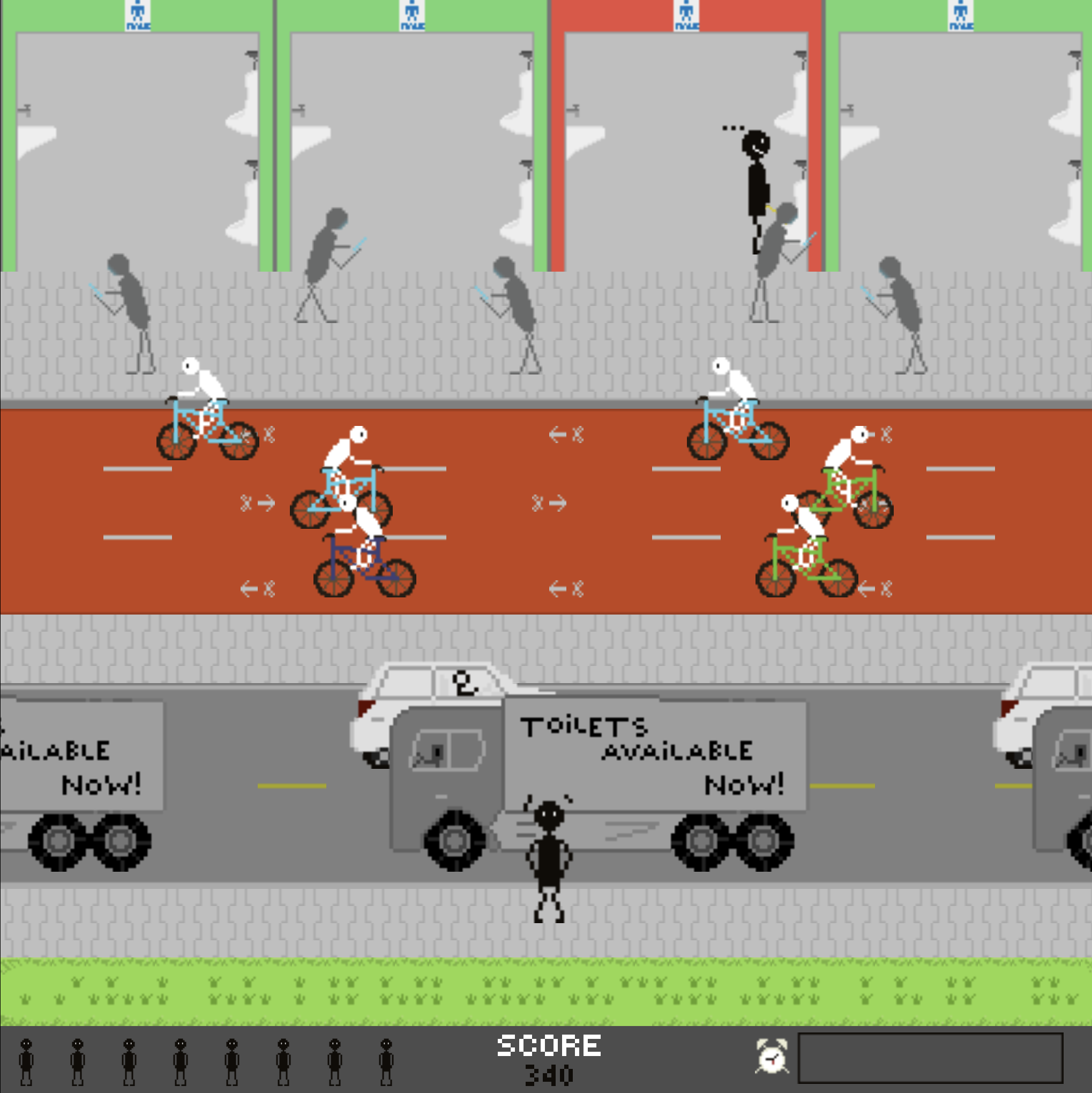
Here's the original level design, the colors are very striking and don't work well together:
The ugly
I rushed the development during the last days and forcibly worked on it to get it out to the public. That's it. That's the biggest and ugliest mistake I made so far in the game development journey.
The mixture of learning how to create art, realizing how difficult it is, combined with some code being tricky (remember the initial movement trickiness of the player), subconsciously made me rush the game to be done with it.
This game didn't feel good to develop
At this point, I cannot tell you yet why exactly as I am still discovering that myself, but something about this game just didn't really motivate me. Maybe it's the genre of the game, or its mechanics but nothing about it really excited me.
Of course, the obvious answer may be what I mentioned above regarding learning art.
The general feedback
The level design, game's difficulty, and art didn't receive good feedback from friends, family and the lovely people out there who gave the game a shot. Too gray, too bland, not clear enough, too slow, too fast, .. List goes on.
This, alongside my own dissatisfaction from how I rushed the process and forgot that everything I am doing is to have fun and learn, motivated me to remake all the art, review all of the scripts I had written, test more extensively to catch bugs, etc.
Original announcement
After I originally announced the game, it didn't feel good. I did not feel like I just achieved something, I did not feel like I felt with the first two games, Tricat and Keybricks. Something was missing. I felt a strong sense of de-motivation. I think the little voice inside me was shouting that I didn't put the effort into the game. That with a few tweaks and, most importantly, patience, it can be a much better working & looking game.
So I told myself and everyone else that instead of diving into the next game (Asteroids, by the way), I should take at least a week to process everything I had learned so far, and in the meantime also apply all of it into the game.
Re-ignition
At the end of it all, this made me very passionate. As soon as I began working on the game with the goal to improve it, I noticed in many ways that I have improved in my art, albeit so slightly. I was faster at drawing, making decisions, and spent way less hours drawing again and again. The code that felt flaky, I saw much better and found many ways to improve it. This lead me to learning with pleasure again, and coming to today.
A day when I release the game and am actually happy about it, I spent a lot more effort and time into the promotion of it. Creating a more proper cover art for itch.io, created a better logo. I'm proud of my work!
I explore this process a lot more in a separate post: Improving "I need to go"
Lessons learned
Many of them, and on many levels.
Technically, I understand more about Godot and game programming patterns.
Artistically, my basics in 2D art and animation have definitely seen improvement, and I cannot wait to improve much more.
Mentally, I am still figuring out what makes me tick, and in what way. One thing is clear though, I really enjoy making games so far, even if some parts of it feel tedious, outright frustrating, or even demotivating.
To sum up the technical stuff:
- Raycasts are very cool, not sure about optimal use cases though.
- TextureProgressBar is quirky but awesome otherwise!
- Grid/distance/step-based movement
Let me know what you think of the game, try it out on itch.io!
Hopefully my games, and with them, my learnings can bring some value to you on your own journey!
Thanks for reading! ❤️

I want to read more!
It'd be my honor.
- I need to go released!: Play the game yourself!
- Improving "I need to go": Learning about color theory and comparing!
- TextureProgressBar issue in Godot: A tutorial on fixing a UI issue.